
sjh9714/dsh-movein
61Last commit Aug 18, 2026
dsh-movein DSH plugin
dsh-movein is a DSH plugin that migrates all Claude Code assets — skills, MCP servers, hooks, commands, subagents, and permission rules — into DeepSeek Harness. It can be installed as a plugin or run standalone via npx. Dry-run is the default for safety, and backups are created before each write.
How to install the dsh-movein DSH plugin
dsh plugin --profile web add dsh-moveinCopying does not run this command. Review the repository and version before installing the dsh-movein DSH plugin.
dsh-movein DSH plugin data source
dsh-movein DSH plugin snapshot date: Aug 18, 2026
discovered
What the dsh-movein DSH plugin can do
- Migrate global CLAUDE.md to AGENTS.md via symlink or copy.
- Convert .mcp.json to dsh-mcp-client entries in cordis.patch.yml, keeping tool names identical.
- Wire hooks through the dsh-hooks-claude-code bridge so they run unchanged.
- Convert subagents (.claude/agents) and slash commands (.claude/commands) into DSH skills.
- Provide a doctor command to verify post-move health, check for YAML silent-drop issues, and validate package references.
- Support reverse migration (--reverse) to bring DSH-born skills and instructions back to Claude Code.
Where the dsh-movein DSH plugin fits
- Switch from Claude Code to DeepSeek Harness without reconfiguring skills, MCP, or hooks.
- Dual-boot between Claude Code and DSH, keeping both setups in sync via symlinks.
- Audit and verify a migration with dry-run and doctor commands before applying changes.
- Restore from automatic backups if an apply causes issues.
Who the dsh-movein DSH plugin is for
- Claude Code users who want to move their existing configuration to DeepSeek Harness.
- DSH users who want to leverage Claude Code's skills, MCP servers, and hooks in their DSH environment.
- Developers maintaining both Claude Code and DSH setups who need a consistent migration path.
dsh-movein DSH plugin limitations
- Session history migration is out of scope; use dsh-chat-import for that.
- On reverse migration, hand-written DSH MCP and hook rows are not machine-reversible.
- Permission rules require the companion dsh-movein-permissions plugin or the --emit-rules option.
- DSH is a developer preview; plugin contracts may change, requiring fast patches.
dsh-movein DSH plugin: from the repository README
Quoted from the sjh9714/dsh-movein README, the upstream source of the dsh-movein DSH plugin. Copyright remains with the original authors.
Listed in <a href="https://github.com/awesome-dsh-plugin/awesome-dsh-plugin">awesome-dsh-plugin</a> · <a href="https://github.com/0xsline/awesome-deepseek-harness">awesome-deepseek-harness</a> · cited by <a href="https://github.com/Electricitysheep/dsh-handbook">dsh-handbook</a> </p> Move your whole Claude Code setup into [DeepSeek Harness (DSH)](https://github.com/deepseek-ai/deepseek-harness) with one command. Skills, MCP servers, hooks and instructions arrive together, so DSH feels like home from the first prompt. 从 Claude Code 拎包入住 DSH。一条命令搬完技能、MCP、hooks 和全局指令。 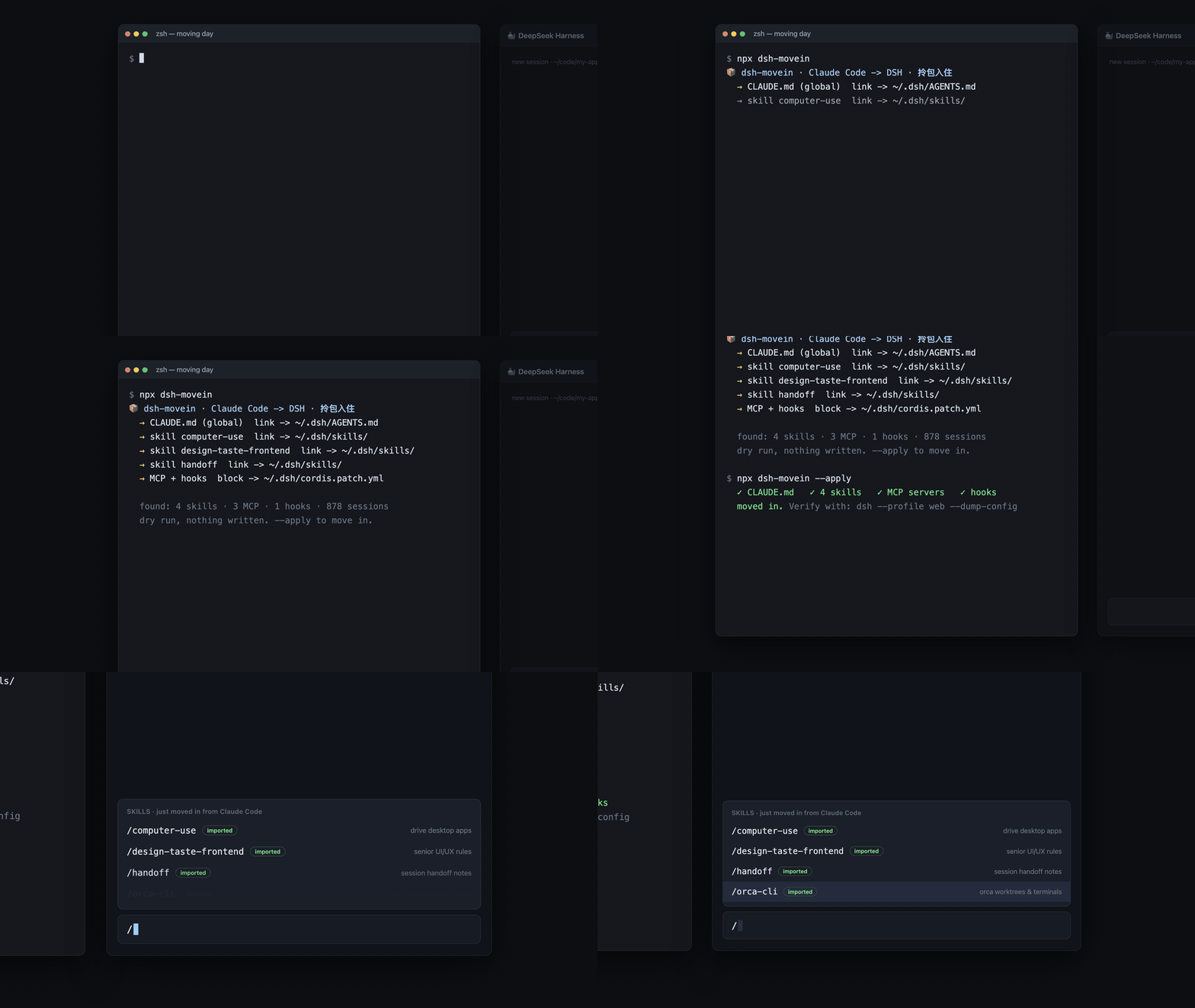 ```sh dsh plugin --profile web add dsh-movein ``` Restart `dsh web`, then say "move my Claude Code setup over". The plugin exposes a `movein_from_claude_code` tool (dry run by default, `apply=true` to move). Or run it standalone, no DSH plugin needed: ```sh npx dsh-movein # dry run, shows the moving estimate npx dsh-movein --apply # actually move in npx dsh-movein doctor # verify the move afterwards, any time ``` ``` 📦 dsh-movein · Claude Code -> DeepSeek Harness moving estimate · 拎包入住 → CLAUDE.md (gl
Read the full READMERepository license: MIT
dsh-movein DSH plugin questions
How do I install dsh-movein as a DSH plugin?
Run `dsh plugin --profile web add dsh-movein` in your terminal. After installation, restart `dsh web` and then say 'move my Claude Code setup over' to trigger the migration tool. You can also run it standalone via `npx dsh-movein` without installing as a plugin.
Is it safe to run dsh-movein?
Yes, dry-run is the default and nothing is written without the `--apply` flag. A backup of cordis.patch.yml is automatically created before each write, and you can restore it with `npx dsh-movein restore`. The tool has zero dependencies and is small enough to audit.
What does dsh-movein actually migrate?
It migrates global CLAUDE.md (linked to AGENTS.md), skills from .claude/skills, MCP servers from .mcp.json, hooks from settings.json, subagents from .claude/agents, slash commands from .claude/commands, and permission rules. It also handles reverse migration from DSH back to Claude Code.
Can I use dsh-movein to migrate session history?
No, session history is out of scope for dsh-movein. For conversation history migration, please use the separate dsh-chat-import tool. dsh-movein focuses on configuration assets like skills, MCP, hooks, and commands.
How do I verify the migration was successful?
Run `npx dsh-movein doctor` after applying the migration. This health check verifies that all destinations exist, checks for YAML silent-drop issues (DSH #1401), validates package references in cordis.patch.yml, and ensures hook matchers work with DSH's lowercase tool names.