
sjh9714/dsh-movein
61最近提交 2026年8月18日
dsh-movein DSH 插件
dsh-movein 是 DSH 插件,能把 Claude Code 的技能、MCP 服务器、hooks、命令、子代理和权限规则一次性迁移到 DeepSeek Harness。可作为插件安装,也可通过 npx 独立运行。默认预演,写入前自动备份,安全可靠。
如何安装 dsh-movein DSH 插件
dsh plugin --profile web add dsh-movein复制不会执行命令。安装 dsh-movein DSH 插件前请核对仓库和版本。
dsh-movein DSH 插件数据来源
dsh-movein DSH 插件快照日期:2026年8月18日
discovered
dsh-movein DSH 插件能做什么
- 将全局 CLAUDE.md 链接或复制为 AGENTS.md。
- 将 .mcp.json 转换为 cordis.patch.yml 中的 dsh-mcp-client 配置行,工具名完全一致。
- 通过 dsh-hooks-claude-code 桥接器让 hooks 原样运行。
- 将子代理 (.claude/agents) 和斜杠命令 (.claude/commands) 转换为 DSH 技能。
- 提供 doctor 命令检查迁移后资产健康、YAML 静默丢弃问题及包引用有效性。
- 支持反向迁移 (--reverse),将 DSH 中生成的技能和指令导回 Claude Code。
dsh-movein DSH 插件适合哪些场景
- 从 Claude Code 切换到 DeepSeek Harness,无需重新配置技能、MCP 或 hooks。
- 双系统使用 Claude Code 和 DSH,通过符号链接保持配置同步。
- 在应用前通过预演和 doctor 命令审计和验证迁移。
- 如果迁移出现问题,从自动备份中回滚。
dsh-movein DSH 插件适合谁
- 希望将现有 Claude Code 配置迁移到 DeepSeek Harness 的用户。
- 在 DSH 环境中想利用 Claude Code 技能、MCP 服务器和 hooks 的开发者。
- 同时维护 Claude Code 和 DSH 设置、需要统一迁移路径的开发者。
dsh-movein DSH 插件的限制
- 会话历史迁移不在范围内,请使用 dsh-chat-import。
- 反向迁移时,手工编写的 DSH MCP 和 hook 行无法自动反向。
- 权限规则需要配套插件 dsh-movein-permissions 或 --emit-rules 选项。
- DSH 仍是开发者预览版,插件协议可能变更,需快速适配。
dsh-movein DSH 插件的仓库 README 摘录
以下文字摘自 dsh-movein DSH 插件的上游仓库 sjh9714/dsh-movein 的 README,版权归原作者,仅作引用。
Listed in <a href="https://github.com/awesome-dsh-plugin/awesome-dsh-plugin">awesome-dsh-plugin</a> · <a href="https://github.com/0xsline/awesome-deepseek-harness">awesome-deepseek-harness</a> · cited by <a href="https://github.com/Electricitysheep/dsh-handbook">dsh-handbook</a> </p> Move your whole Claude Code setup into [DeepSeek Harness (DSH)](https://github.com/deepseek-ai/deepseek-harness) with one command. Skills, MCP servers, hooks and instructions arrive together, so DSH feels like home from the first prompt. 从 Claude Code 拎包入住 DSH。一条命令搬完技能、MCP、hooks 和全局指令。 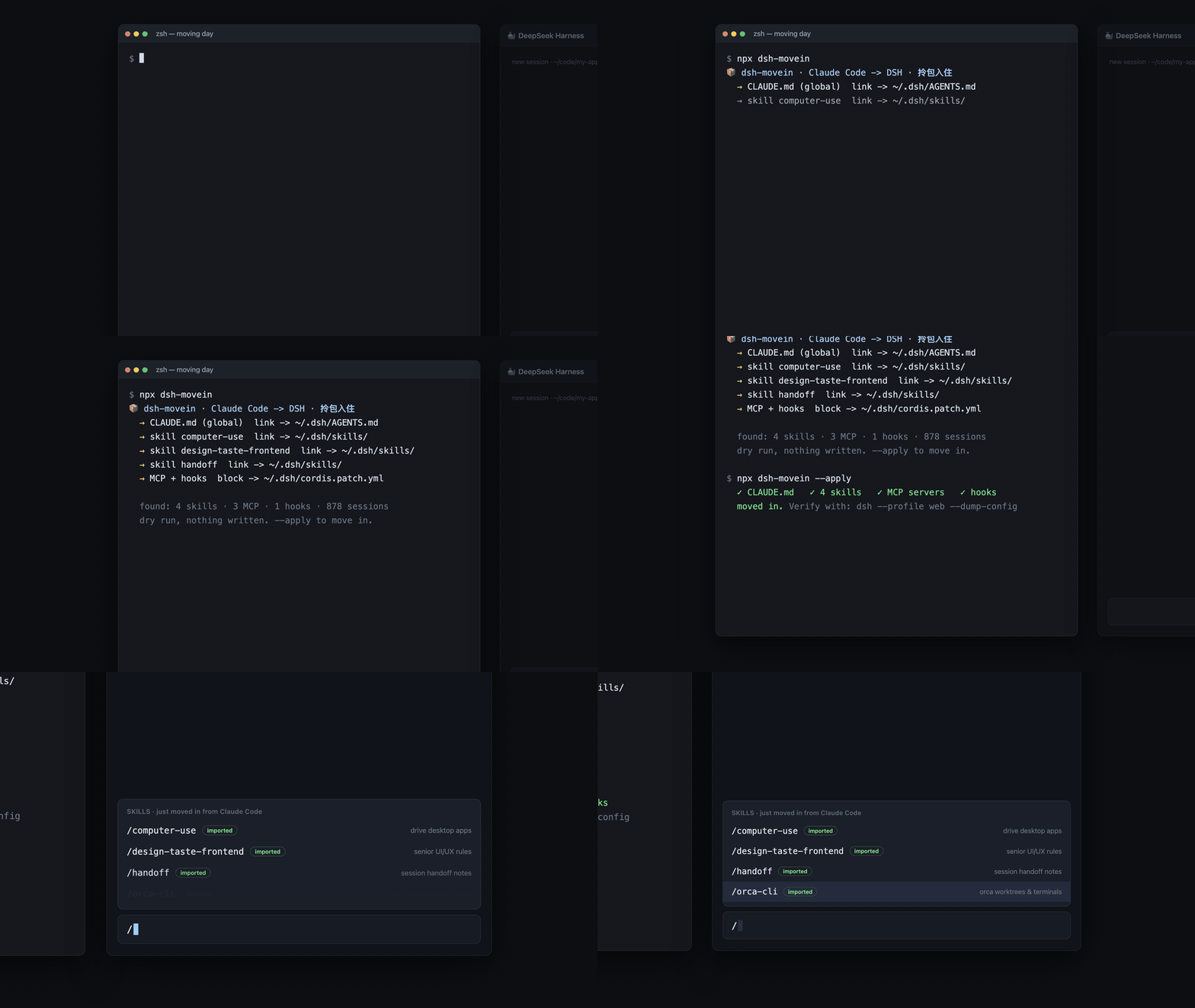 ```sh dsh plugin --profile web add dsh-movein ``` Restart `dsh web`, then say "move my Claude Code setup over". The plugin exposes a `movein_from_claude_code` tool (dry run by default, `apply=true` to move). Or run it standalone, no DSH plugin needed: ```sh npx dsh-movein # dry run, shows the moving estimate npx dsh-movein --apply # actually move in npx dsh-movein doctor # verify the move afterwards, any time ``` ``` 📦 dsh-movein · Claude Code -> DeepSeek Harness moving estimate · 拎包入住 → CLAUDE.md (gl
阅读完整 README仓库许可: MIT
dsh-movein DSH 插件常见问题
如何将 dsh-movein 安装为 DSH 插件?
在终端运行 `dsh plugin --profile web add dsh-movein` 即可安装。安装后重启 `dsh web`,然后说“帮我把 Claude Code 的配置搬过来”即可触发迁移工具。你也可以不安装插件,直接通过 `npx dsh-movein` 独立运行。
dsh-movein 安全吗?
安全。默认是预演模式,不加 `--apply` 不会写入任何文件。每次写入前会自动备份 cordis.patch.yml 到 `~/.dsh/movein-backups/`,可通过 `npx dsh-movein restore` 恢复。该工具零依赖,代码量小,便于审计。
dsh-movein 具体迁移哪些内容?
迁移全局 CLAUDE.md(链接到 AGENTS.md)、技能目录(.claude/skills)、MCP 服务器(.mcp.json)、hooks(settings.json)、子代理(.claude/agents)、斜杠命令(.claude/commands)以及权限规则。还支持反向迁移,将 DSH 中生成的技能和指令导回 Claude Code。
dsh-movein 能迁移会话历史吗?
不能。会话历史迁移不在 dsh-movein 范围内,请使用专门的 dsh-chat-import 工具。dsh-movein 专注于技能、MCP、hooks 和命令等配置资产的迁移。
如何验证迁移是否成功?
迁移完成后运行 `npx dsh-movein doctor` 即可。该体检命令会检查每个目标文件是否存在、检测 DSH YAML 解析器静默丢弃的问题(#1401)、验证 cordis.patch.yml 中引用的包是否可解析,以及确保 hook 匹配器能正确处理 DSH 的小写工具名。