
lucasx001/dsh-skin-claude-code
30Last commit Aug 15, 2026
dsh-skin-claude-code DSH plugin
This skin restyles the DeepSeek Harness web interface with colors and typography inspired by Claude Code. It uses a token-override layer to adapt automatically to light, dark, and system preferences without modifying the original theme.
How to install the dsh-skin-claude-code DSH plugin
dsh plugin --profile web add dsh-skin-claude-codeCopying does not run this command. Review the repository and version before installing the dsh-skin-claude-code DSH plugin.
dsh-skin-claude-code DSH plugin data source
dsh-skin-claude-code DSH plugin snapshot date: Aug 18, 2026
discovered
What the dsh-skin-claude-code DSH plugin can do
- Applies warm charcoal/cream surfaces and terracotta accent colors to the web GUI
- Uses JetBrains Mono or ui-monospace monospace font for terminal typography
- Supports light, dark, and system preference modes via a reversible token overlay
- Installs as a DSH bundle with auto-registration, no manual patch editing required
- Degrades safely across harness updates by using only public theme tokens
Where the dsh-skin-claude-code DSH plugin fits
- Customizing the DeepSeek Harness web GUI to match Claude Code aesthetic
- Creating a warmer, more readable interface for developers who prefer monospace text
- Trying a different visual theme without modifying the underlying theme files
- Quickly applying a skin that works across light and dark modes automatically
- Using the skin as a base for further customization by editing the token map
Who the dsh-skin-claude-code DSH plugin is for
- DeepSeek Harness users who want a Claude Code–inspired look
- Developers who prefer a warm color palette and monospace interface in their AI tooling
dsh-skin-claude-code DSH plugin limitations
- Only affects the web GUI of DeepSeek Harness, not the terminal or other interfaces
- Requires an existing DeepSeek Harness installation with the web profile configured
- The skin is purely cosmetic and does not add any new functionality
dsh-skin-claude-code DSH plugin: from the repository README
Quoted from the lucasx001/dsh-skin-claude-code README, the upstream source of the dsh-skin-claude-code DSH plugin. Copyright remains with the original authors.
English | [中文](README.zh.md) A **Claude Code–inspired skin** for the [DeepSeek Harness](https://github.com/deepseek-ai/deepseek-harness) web GUI. It restyles the browser surface with Claude Code's signature look: - **Warm charcoal / warm cream** surfaces instead of the stock cool grays - **Terracotta accent** (`#D97757`) for brand, focus, caret, links, and scrollbars - **Monospace terminal typography** (JetBrains Mono / ui-monospace fallback) - Warm-tinted code blocks and `code`/`pre` surfaces The skin stacks a token-override layer over whatever theme is active, so it adapts automatically to **light**, **dark**, and **system** preferences. ## Preview | Dark | Light | | --- | --- | | 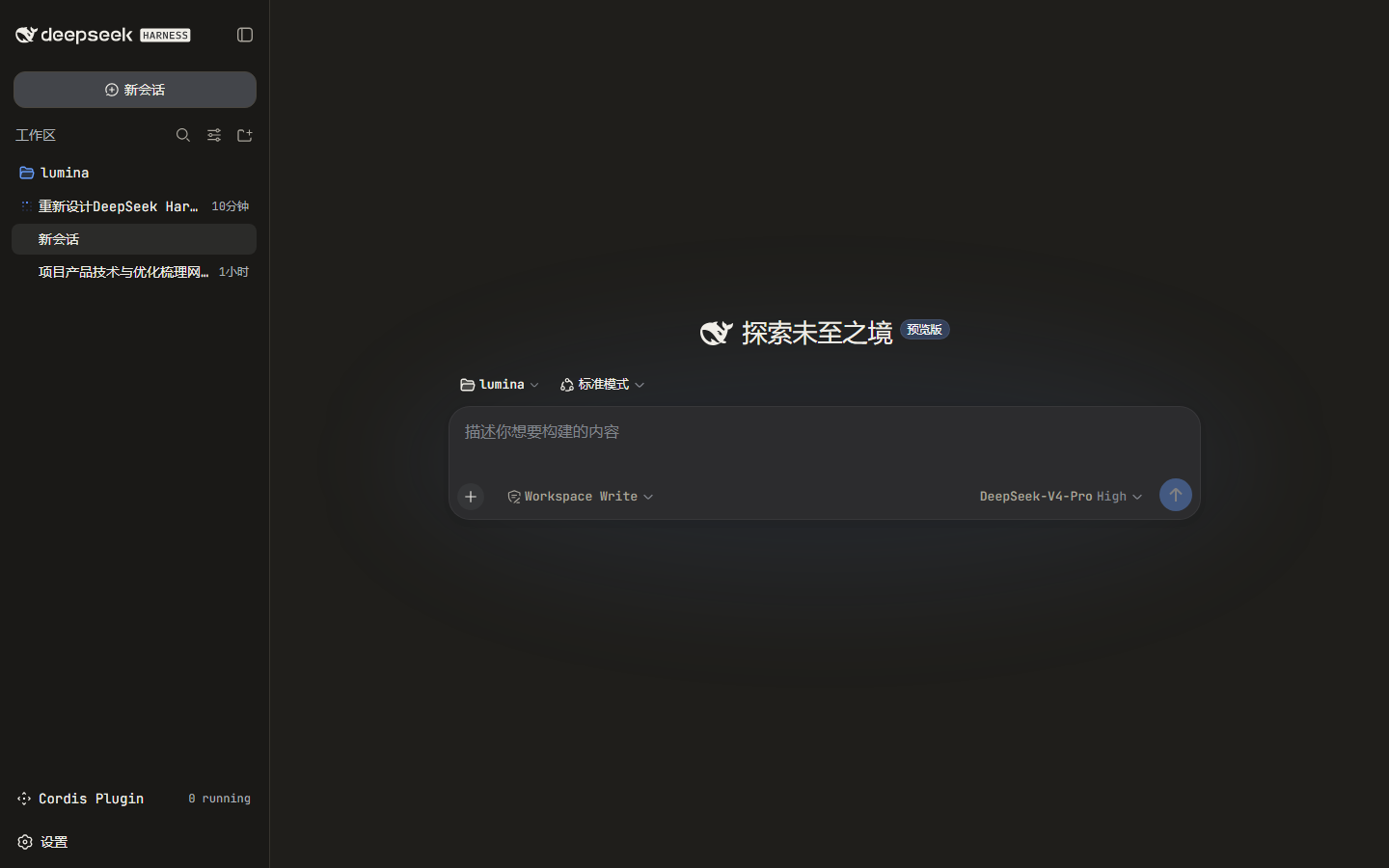 | 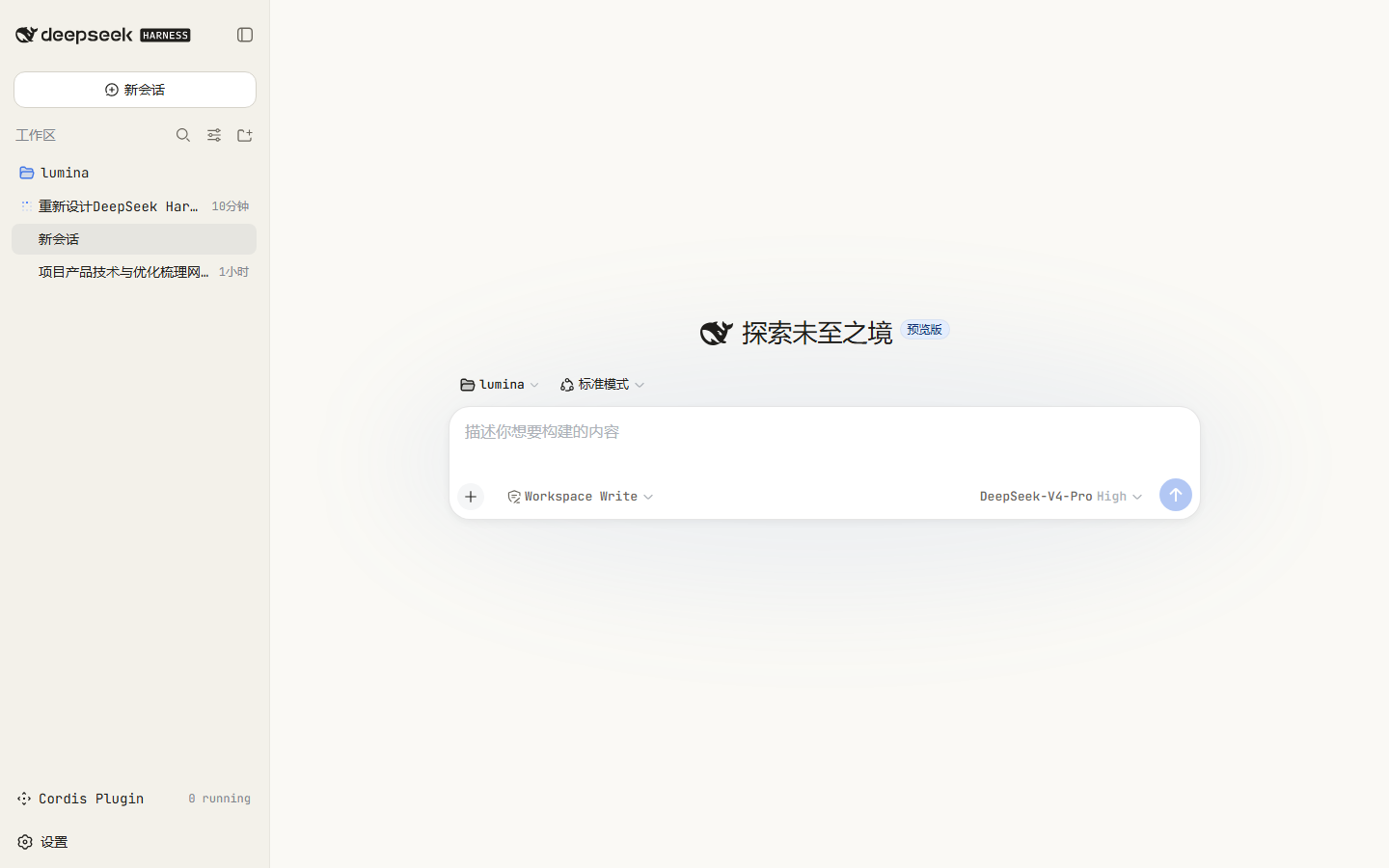 | --- ## Install The package is a DSH **bundle**: its `package.json` declares `dsh.bundle.patch`, so `dsh plugin add` installs it **and** auto-registers it as a profile layer. No `cordis.patch.yml` editing is required. ```sh dsh plugi
Read the full READMERepository license: MIT
dsh-skin-claude-code DSH plugin questions
How do I install dsh-skin-claude-code?
Run the command `dsh plugin --profile web add dsh-skin-claude-code` in your DeepSeek Harness environment. Then start the web interface with `dsh web`. The plugin will automatically register itself as a skin layer. An alternative is to run `./install.sh` from the repository root.
Does this plugin work with both light and dark modes?
Yes, the skin automatically adapts to light, dark, and system preferences. It uses a token-override layer that provides separate color values for each mode, so the appearance changes seamlessly when you switch themes.
Can I customize the colors or fonts myself?
Absolutely. You can edit the `TOKENS` map and `CSS` template in `lib/client.js` in the repository. The files are hand-written build artifacts, so no bundler step is required. After making changes, republish the package or install from your clone.
Will this skin break when DeepSeek Harness updates?
The skin is designed to degrade safely. It only uses the public `--dsw-alias-*` theme tokens and generic elements, avoiding product-specific DOM selectors. If the tokens change in a future update, the skin may lose some styling but won't break the interface.
Does the skin add any new features to the web GUI?
No, it is purely cosmetic. It changes the appearance (colors, fonts, surfaces) but does not add any new functionality or modify the behavior of the DeepSeek Harness web interface.