
Zhen-WushuiLingchun/dsh-plugin-market
40Last commit Aug 15, 2026
dsh-plugin-market DSH plugin
DSH Plugin Market adds a VS Code-style extension icon to the workspace title bar. Clicking it opens a panel that searches GitHub repositories tagged as DSH plugins. Instead of executing unknown code directly, it creates a new DSH session and sends the repository info along with a fail-closed installation prompt, letting the DSH agent audit the plugin before installing.
How to install the dsh-plugin-market DSH plugin
dsh plugin --profile web add @hydrogenoxide18/dsh-plugin-marketCopying does not run this command. Review the repository and version before installing the dsh-plugin-market DSH plugin.
dsh-plugin-market DSH plugin data source
dsh-plugin-market DSH plugin snapshot date: Aug 18, 2026
discovered
What the dsh-plugin-market DSH plugin can do
- Search GitHub for DSH plugins by repository name or description
- Preview repository README, metadata, and star count without leaving DSH
- Safe installation workflow: agent audits README and plugin structure before execution
- Persists across restarts via profile manifest (dsh.bundle)
- Does not write search results or repo code to disk; only stores installation state in DSH session logs
Where the dsh-plugin-market DSH plugin fits
- Discover new DSH plugins from the community
- Safely install plugins without manually inspecting every repository
- Preview plugin details and documentation before deciding to install
- Manage installed plugins directly from the Web GUI workspace
Who the dsh-plugin-market DSH plugin is for
- DSH Web GUI users who want to extend functionality
- Plugin developers who want to showcase their work in a discoverable marketplace
dsh-plugin-market DSH plugin limitations
- Only works with the Web profile (installation command targets `--profile web`)
- Relies on GitHub search API; network access required and may be affected by rate limits
- Currently uses a DOM adapter for the entry icon because DSH's official workspace title action slot is not yet public
- Installation requires restarting `dsh web` after adding the plugin
dsh-plugin-market DSH plugin: from the repository README
Quoted from the Zhen-WushuiLingchun/dsh-plugin-market README, the upstream source of the dsh-plugin-market DSH plugin. Copyright remains with the original authors.
面向 [DeepSeek Harness](https://github.com/deepseek-ai/deepseek-harness) Web GUI 的持久化 Cordis 插件市场。它在“工作区”标题右侧、搜索/筛选/添加工作区之后放置一个 VS Code 风格的扩展图标,点击后从 GitHub 搜索 DSH 插件。 选择仓库并点击“安装”后,市场不会自行执行陌生仓库代码。它会在当前工作区创建一个新会话,把仓库地址、简介和一段 fail-closed 安装提示发送给 DSH 智能体,由智能体先审计 README 和插件结构,再执行并验证安装。 ## 界面预览 插件市场以第 4 个动作图标进入,不占用工作区列表,也不会在 Settings 上方增加常驻按钮。 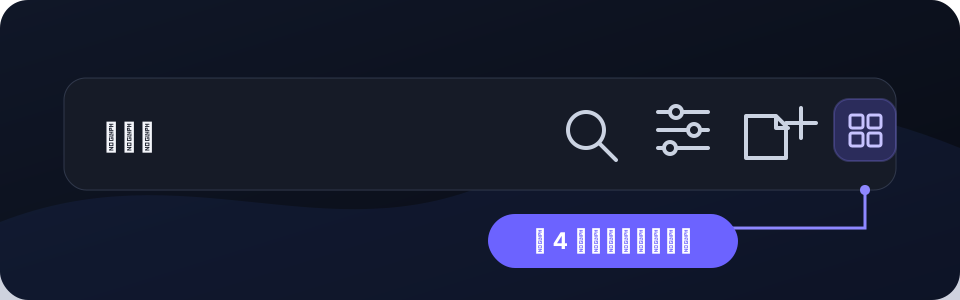 面板直接搜索 GitHub 仓库,并展示简介、Star 数、语言、预览和安装入口。 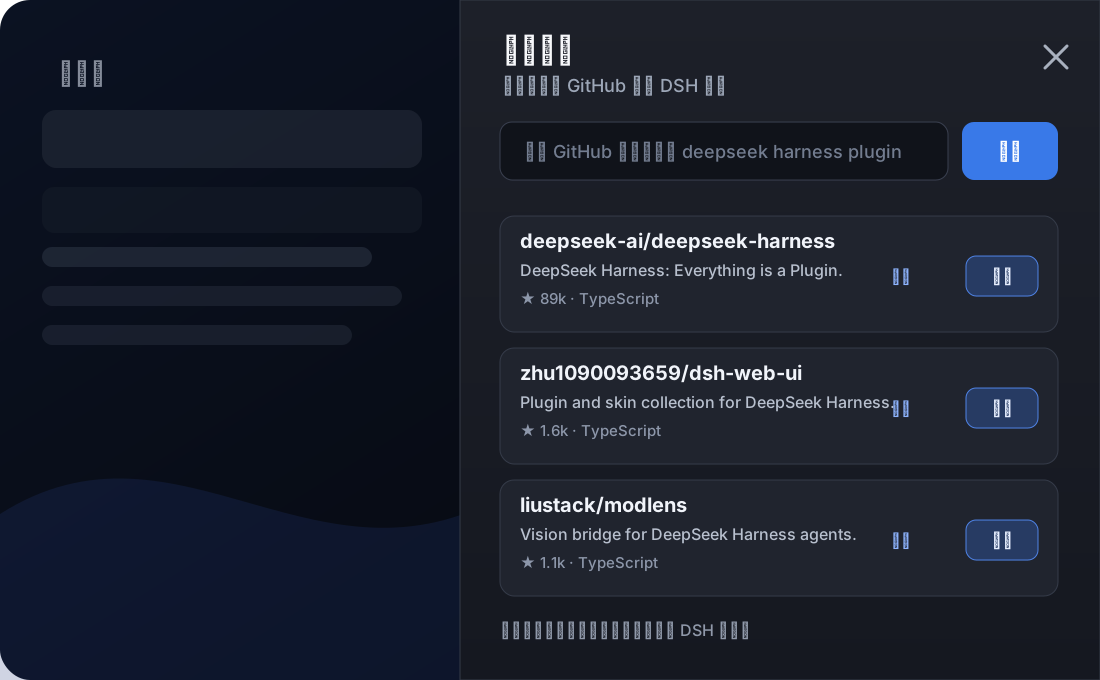 点击仓库名称或“预览”后,会在同一个右侧抽屉中读取仓库元数据与 README;不跳离 DSH。详情页保留 GitHub/安装入口,点“返回插件市场”会恢复原搜索结果和列表滚动位置。 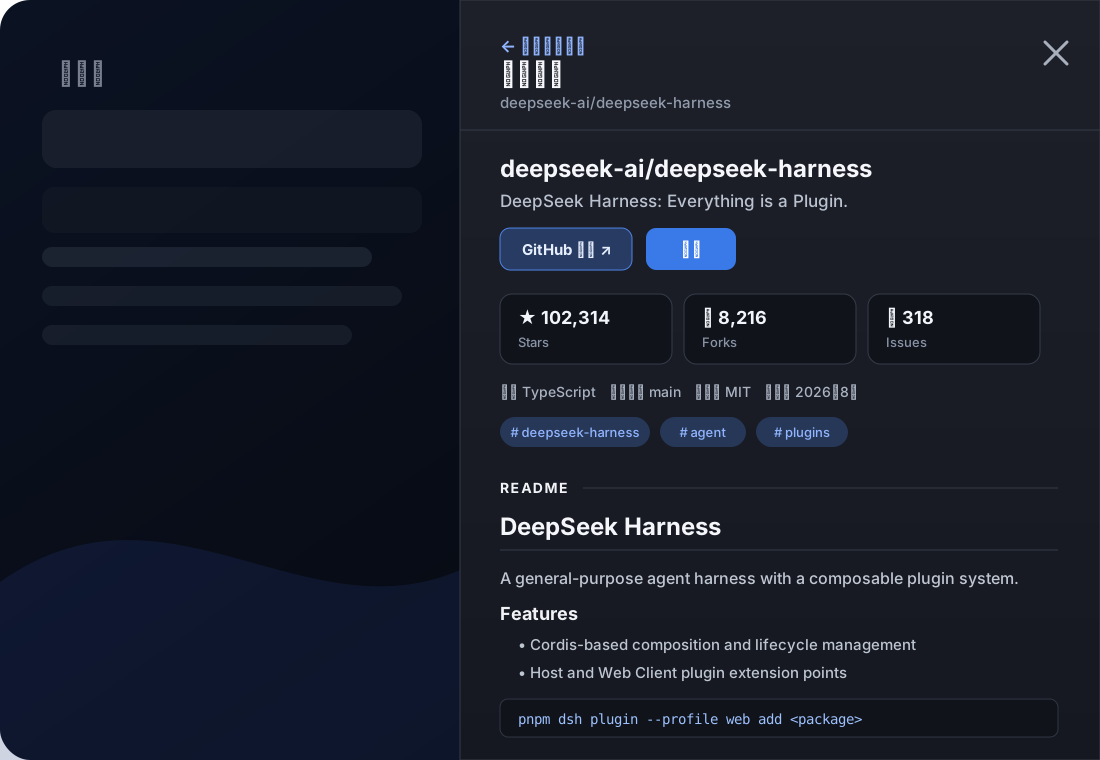 ## 安装工作流 “安装”不会直接执行仓库代码,而是把仓库信息和约束提示交给当前工作区的新 DSH 会话。 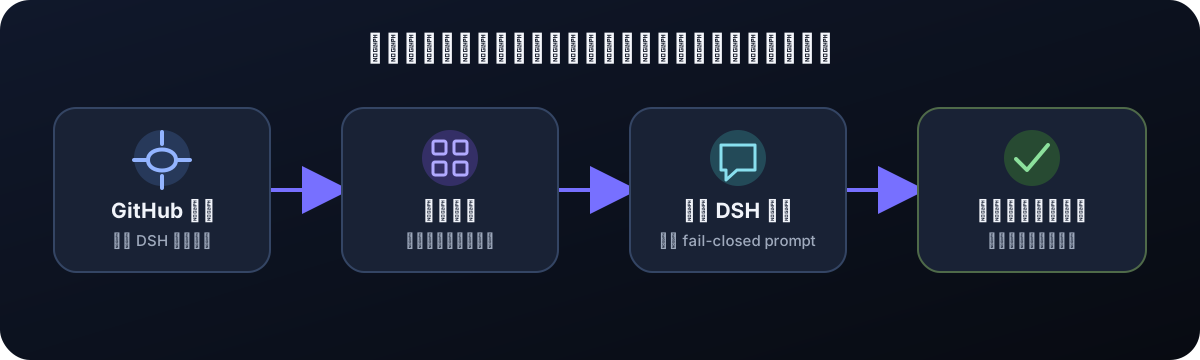 ## 安装 从 npm registry 安装到 Web profile: ```powershell pnpm dsh plugin --profile web add @hydrogenoxide18/dsh-plugin-market ``` 安装只修改 `$DSH_HOME/profiles/web` 的依
Read the full READMERepository license: MIT
dsh-plugin-market DSH plugin questions
How do I install the DSH Plugin Market?
Run `pnpm dsh plugin --profile web add @hydrogenoxide18/dsh-plugin-market` in your terminal. Then restart `dsh web` to see the plugin market icon in the workspace title bar. You can verify the installation with `pnpm dsh --profile web --dump-config`.
Does the plugin market execute code from GitHub repositories directly?
No. When you click "Install", the market creates a new DSH session and sends the repository info along with a fail-closed installation prompt. The DSH agent will first audit the README and plugin structure before executing any code. This is a safety measure to prevent running untrusted code.
Can I preview a plugin's README before installing?
Yes. Click the repository name or the "Preview" button in the market panel. The README and metadata will be displayed in the same side drawer without leaving the DSH interface. You can then return to the search results with the original scroll position preserved.
Will the plugin market survive after I restart DSH?
Yes, because it declares itself as a persistent bundle (`dsh.bundle`) and is added to the profile manifest via `dsh plugin --profile web add`. After restart, the Loader will remount it automatically. Search results and repo previews are kept only in memory, not on disk.
What if I want to remove the plugin market?
Run `pnpm dsh plugin --profile web remove @hydrogenoxide18/dsh-plugin-market` in your terminal. This will remove the bundle from the profile manifest. Restart `dsh web` to fully unload it. The button and overlay will be cleaned up automatically.