
Uddoo/dsh-dashboard
30Last commit Aug 15, 2026
dsh-dashboard DSH plugin
dsh-dashboard integrates with DeepSeek Harness to provide a task board that pulls tasks from Linear, GitHub, Jira, Asana, GitLab, or a local store. It orchestrates each task as a separate Harness Agent session, preserving native features like shell, sidebar, tools, and permissions. The Dashboard sidebar entry shows real-time task state, session info, and configuration.
How to install the dsh-dashboard DSH plugin
dsh plugin --profile web add dsh-dashboard@0.7.0Copying does not run this command. Review the repository and version before installing the dsh-dashboard DSH plugin.
dsh-dashboard DSH plugin data source
dsh-dashboard DSH plugin snapshot date: Aug 18, 2026
discovered
What the dsh-dashboard DSH plugin can do
- Supports multiple task providers: Linear, GitHub, Jira, Asana, GitLab, and local tasks.
- Uses WORKFLOW.md with YAML frontmatter and Liquid prompt for configuration, with hot reload validation.
- Manages per-task workspaces with lifecycle hooks: after_create, before_run, after_run, before_remove.
- Provides a Dashboard entry in the native Harness sidebar showing task state, runtime, projects, and credential health.
- Retries failed runs with bounded exponential backoff and rechecks source state before dispatch.
- Maintains a durable Project Catalog in Harness storage with explicit registration or bounded scan.
Where the dsh-dashboard DSH plugin fits
- Automate the review and testing of GitHub Issues by turning each issue into a Harness Agent run.
- Manage feature development tasks from Linear, with priority ordering and per-state concurrency limits.
- Use local tasks for personal or offline workflows without external credentials.
- Integrate Jira Cloud project issues into a Harness-based operational board for team coordination.
Who the dsh-dashboard DSH plugin is for
- Developers who use DeepSeek Harness and want to connect external task tracking systems.
- Teams that need to orchestrate complex workflows from multiple project management tools within Harness.
dsh-dashboard DSH plugin limitations
- Requires DeepSeek Harness Web profile 0.1.0-rc.6 and Node.js 22+ or 24+.
- Needs credentials for each remote provider (except local tasks); credentials must be set via environment variables or credentials file.
- Only one task source is active per WORKFLOW.md; switching tracker.kind changes the board context.
- Does not support pull requests from GitHub; only issues.
dsh-dashboard DSH plugin: from the repository README
Quoted from the Uddoo/dsh-dashboard README, the upstream source of the dsh-dashboard DSH plugin. Copyright remains with the original authors.
English | [简体中文](./README.zh-CN.md) `dsh-dashboard` is a Symphony-compatible task orchestrator and operational board for [DeepSeek Harness](https://github.com/deepseek-ai/deepseek-harness). It turns tasks from Linear, GitHub, Jira, Asana, GitLab, or a Host-local task store into isolated Harness Agent runs while preserving the native Harness shell, sidebar, sessions, tools, model selection, and permission system. 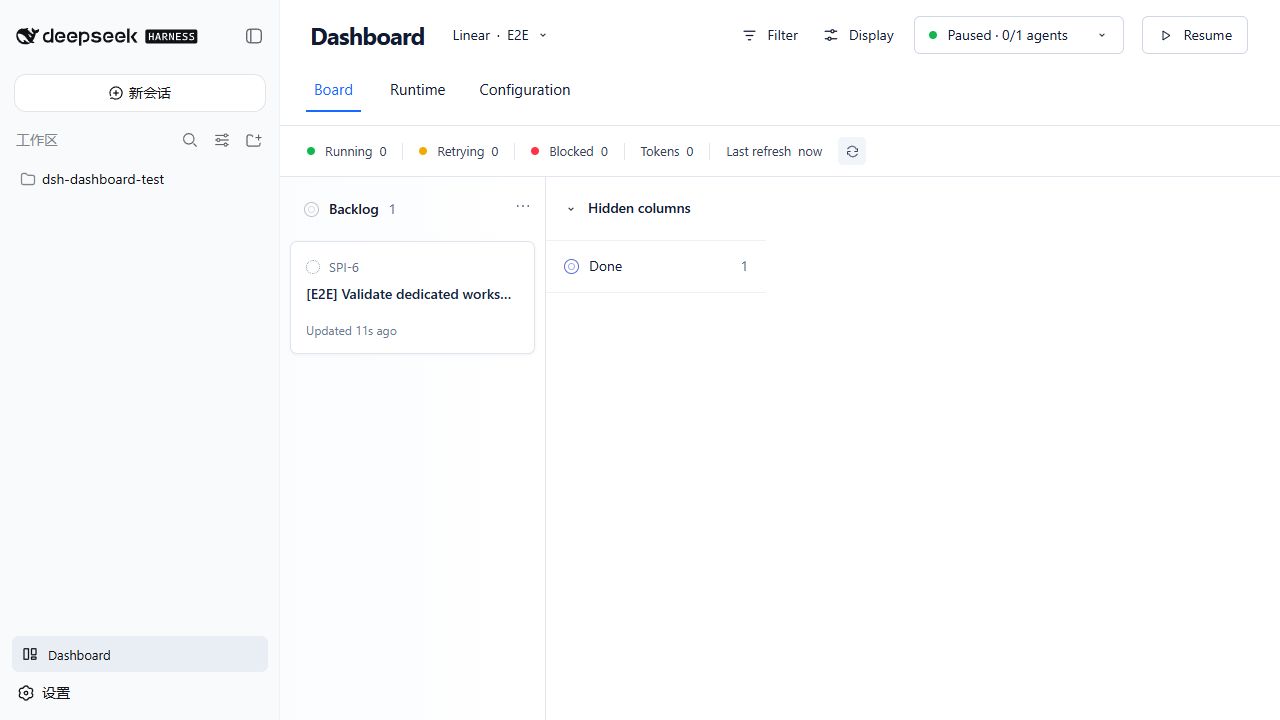 ## Features - Loads a `WORKFLOW.md` with YAML frontmatter and a Liquid prompt. Invalid hot reloads are rejected while the last valid definition remains active. - Supports Linear, GitHub Issues, Jira Cloud, Asana projects, GitLab project issues, and credential-free local tasks. - Applies deterministic priority ordering, required labels, global concurrency, and per-state concurrency limits. - Creates one persistent workspace per task and runs configurable `after_create`, `before_run`, `after_run`, and `before_remove` lifecycle hooks. - Runs through native Harness Agents and continues the same Harness session up to the c
Read the full READMERepository license: MIT
dsh-dashboard DSH plugin questions
How do I install dsh-dashboard?
Run `dsh plugin --profile web add dsh-dashboard@0.7.0` in your terminal. Make sure you have DeepSeek Harness Web profile 0.1.0-rc.6 installed. After installation, restart the Harness web server and you will see the Dashboard entry in the sidebar.
How do I configure credentials for remote providers?
Set environment variables like `LINEAR_API_KEY`, `GITHUB_TOKEN`, `JIRA_EMAIL`, etc., or store them in `$DSH_HOME/.credentials.yaml` in YAML format. Only configure the references needed by your active provider. Dashboard never exposes credential values in its interface.
What is WORKFLOW.md and how do I create one?
WORKFLOW.md is a policy file that defines how tasks are sourced, managed, and executed. It contains YAML frontmatter and a Liquid prompt. You can start from the example files provided in the repository, such as WORKFLOW.example.md, and customize the fields like `tracker.kind`, `project.name`, and `policy` settings.
Which task providers does dsh-dashboard support?
It supports Linear, GitHub Issues, Jira Cloud, Asana, GitLab, and a local task store. Each provider requires specific credentials and configuration in WORKFLOW.md. Only one provider is active per WORKFLOW.md at a time.
How do I uninstall dsh-dashboard?
Run `dsh plugin --profile web remove dsh-dashboard` in your terminal. This will remove the plugin from the Harness profile. You can also delete the package entry from your profile configuration manually.